Plugin version 3.2 GPL licensed
WooCommerce Product Stats and Related
The WooCommerce Product Stats and Related! (WCPST) plugin gives to the shop admin a set of very intuitive and detailed products stats. All the stats you may need, at your fingertips.
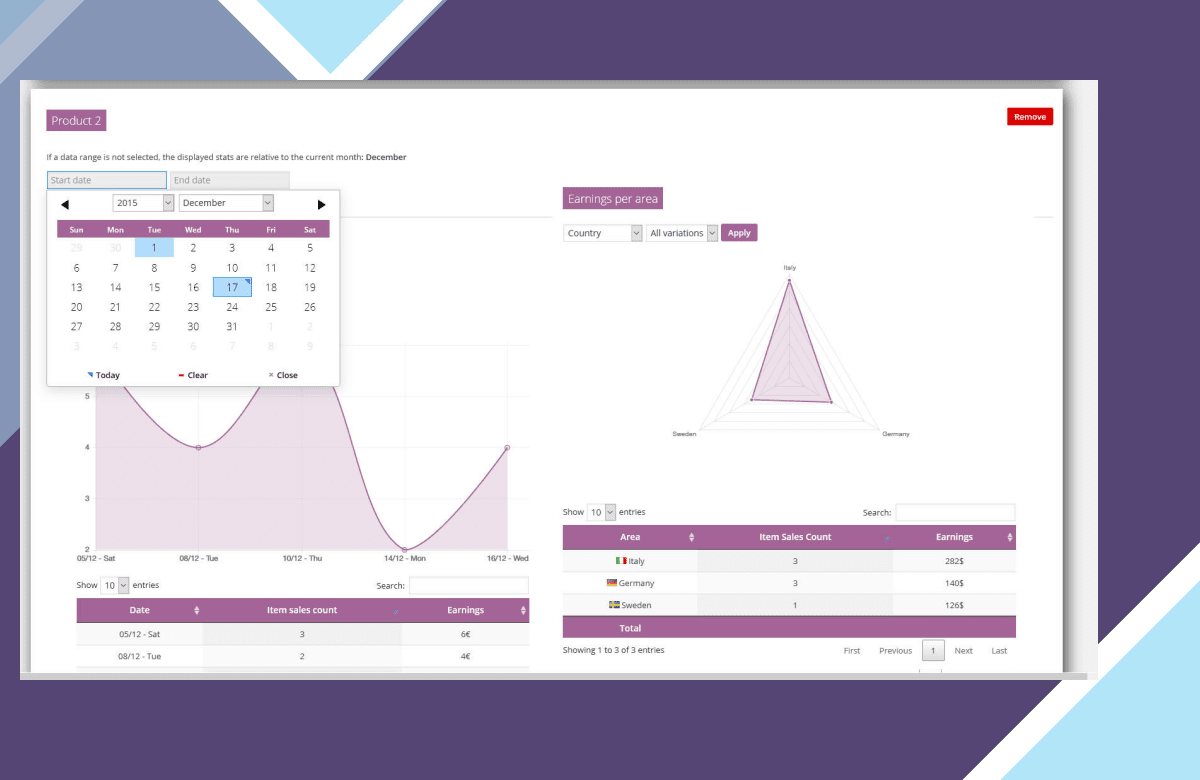
The WooCommerce Product Stats and Related! (WCPST) plugin gives to the shop admin a set of very intuitive and detailed products stats. All the stats you may need, at your fingertips.
HOW IT WORKS
It’s very easy, once installed and activated, you will find a new “Stas” menu voice under “Products” menu voice. Once there, you will be able add “Products cards” in which are reported product stats like:
Product earnings per period (daily, monthly, early)
Product earnings per country/province
Product earnings per customer
Product earnings per payment method
Best related product (the most purchased products with the selected product)
Shop admin can add multiple cards related to different product or the same product (with different time periods)
CONFIGURABLE TIME PERIODS
All stats are filtrabe by time period, in this way the shop admin can retrieve the stats for a single day or for the entire shop live time!
VARIABLE PRODUCTS COMPATIBILY
WCPST will also display products stats even for single variation!
STATS LINK ON PRODUCT LIST PAGE
WCPST will add a new “stats” column on product list page. In this way the shop admin can easily access the product stats page.
RELATED PRODUCTS LIST OVERRIDE
WooCommerce shows on product page, by default, a list of “related” products. However these products are just products that belog to the same category.
The WCPST overrides seamlessly the default behavior populating the list with “real” related products. This is done analizyng orders and finding which are the most purchased products together with the current one!
Further more, using the WooCommerce -> Stats – general options menu, is possible to disable this feature or set the time span used to compute the related products or, in case there aren’t any related products, show as related products the ones which belongs the the same category (normal behavior).
NOTE: This feature requires that a product belongs to a category with at least 2 elements otherwise the default function is not even called so it cannot be overridden.
You can found it at quite the top of the template. In this case the override will always be working.
PURCHASE PRICE FOR A MORE ACCURATE EARNING CALCULATION
For every product and variant (only for WC > 2.5) the shop admin can specify a “Purchase price”. Specifying this value, WCPST can calculate earnings in a more accurate way. Infact for every stat, the earning values will be computed as sale_price – purchase_price.
What are nulled items, and why WooCommerce Product Stats and Related here is the right choice?
All “nulled” means is that the item is preactivated and ready to be used the moment you install it. License notices, if any appear, can simply be ignored — they change nothing about how WooCommerce Product Stats and Related runs. License keys are only ever required for support from the original author, which is of course not included here.
Every item advertised on our site is 100% safe. Each file is tested and verified by three separate anti-virus and anti-malware programs before it is ever listed, and re-checked on every new version we publish.
- Preactivated on install — nothing to enter, nothing to configure
- Original developer files, unmodified and complete
- Scanned by three anti-virus and anti-malware tools
- Distributed under the GPL, the licence WordPress itself uses
Get WooCommerce Product Stats and Related now
Version 3.2, preactivated and ready to install.
More plugins
Browse all → Plugin
WP Sheet Editor – Custom Tables Pro
Plugin
WP Sheet Editor – Custom Tables Pro
 Plugin
WPC Multi Currency for WooCommerce Premium
Plugin
WPC Multi Currency for WooCommerce Premium
 Plugin
Contact Form 7 Extension for AMP
Plugin
Contact Form 7 Extension for AMP
 Plugin
WooCommerce AJAX Products Filter
Plugin
WooCommerce AJAX Products Filter
 Plugin
Paid Memberships Pro – Magic Login
Plugin
Paid Memberships Pro – Magic Login
 Plugin
Meta Box Tabs
Plugin
Meta Box Tabs
 Plugin
Gravity Perks – Entry Blocks
Plugin
Gravity Perks – Entry Blocks
 Plugin
Page Builder Framework Premium Add-On
Plugin
Page Builder Framework Premium Add-On